Local SEO
Local SEO Audit: The 9-Step Checklist I Use for Clients
How I audit a local business step by step, from the Google Business Profile to AI search, with the tools, red flags and time for each step.

When I ran a local SEO audit for Exclusively Equine Veterinary Services, a horse-only vet practice in Queensland, Australia, I found that almost nothing on the SEO side was right.
The Google Business Profile wasn’t optimized. The page URLs weren’t optimized. The content wasn’t written in an SEO-friendly way. Some images were 5 MB, some were 10 MB, and they slowed every page down. Even the layout needed a redesign.
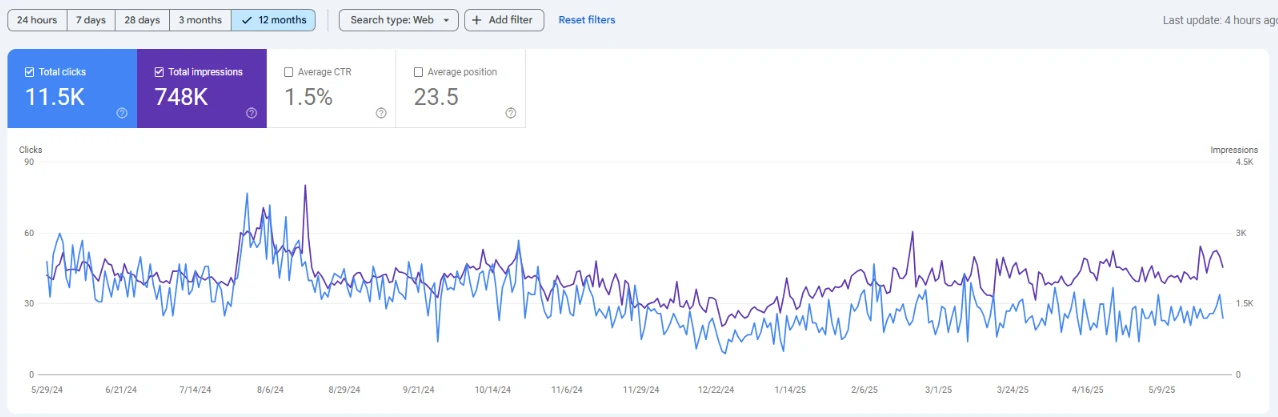
So I fixed them one by one over about three months. After that, the site started getting clicks. Search Console shows 748K impressions and 11.5K clicks over the 12 months to May 2025.
That’s what a local SEO audit is for. It shows you exactly what’s stopping local customers from finding you, and what to fix first.
I’ve done SEO for more than 8 years, on 100+ websites. Below is the same 9-step local SEO audit I run for my clients: what I check, the tools I use, the red flags I look for, and how long each step takes. You can follow it yourself. Or, if you want me to check your business, my audit is free.
Short on time? Here’s what matters most to me
- I always start with the Google Business Profile. For Map Pack rankings, that’s where I see the biggest wins.
- I check rankings from several points across the area, never just one.
- I fix what blocks visibility first (suspension, wrong category, pages not indexed). Polish comes later.
- I now check what ChatGPT, Perplexity and Google AI Mode say about the business.
- I judge success by calls and bookings, not rankings.
What is a local SEO audit?
I explain it to clients like this: a local SEO audit checks everything Google looks at before it shows your business to someone nearby.
Google itself says local results come down to three things (Google Business Profile Help):
- Relevance Do your profile and website match what the person searched?
- Distance How close are you to them? You can’t move your business, but you can make your location and service area clear.
- Prominence How well known are you? Google points to links, articles, directories, review count and rating.
So in an audit, I look at everything that feeds those three: your Business Profile, your listings across the web, your website, your reviews, your links and, these days, what AI tools say about you.
How it’s different from a regular SEO audit. A regular audit is mostly about the website: crawling, indexing, speed and content. A local audit adds everything outside the site that affects the Map Pack, like the Business Profile, citations and reviews. If you serve customers in a specific area, you need both. In my work, the local fixes usually show results faster.
Before you start: what I ask for first
Before I start any audit, I ask for access. Waiting on logins slows things down more than the audit itself.
- Owner or manager access to the Google Business Profile
- Google Search Console and GA4
- The website login
- A list of services and the towns or suburbs the business serves
- The top 3 competitors in the Map Pack (I check these anyway)
I also check the business type first. A few steps change depending on how the business serves customers.
| Storefront | Service-area | Hybrid | |
|---|---|---|---|
| Example | Dental clinic, shop | Plumber, mobile groomer | Vet clinic that also visits farms |
| Address on Google | Shown | Hidden | Shown, plus service areas |
| Location pages | One per real location | Area pages only with real local content | Both |
| Where to check rankings | Around the address | Across the whole service area | Both |
EEVS is a good example of a hybrid. They have a base in Hatton Vale, Queensland, but they also do on-property and ambulatory visits. So I had to check both the address and the wider service area.
How long it takes: if you do it yourself, plan 4 to 8 hours for one location. Multi-location businesses take longer.
How to do a local SEO audit: my 9 steps
I follow the same order every time, because each step feeds the next one.
- Set the baseline
- Audit the Google Business Profile
- Compare the top 3 Map Pack competitors
- Audit citations and NAP consistency
- Audit the website for local signals
- Audit reviews and reputation
- Audit local links and mentions
- Check visibility in AI search
- Check tracking and conversions
Step 1: Set the baseline (keywords, rankings, traffic)
I never change anything before I record where the business stands today. Without a baseline, you can’t prove anything worked.
I pick 5 to 10 keywords that bring paying customers, like “[service] near me” and “[service] [town]”. Then I record:
- Map Pack rank across the area. Rankings change with where the searcher is standing. A business can be #1 next door and missing 5 km away. A geo-grid tool checks the same keyword from many points and shows it as a heat map.
- Organic rank for the same keywords.
- Search Console: clicks, impressions and top queries for the last 3 months.
- Business Profile Performance: views, calls, direction requests and website clicks.
Step 2: Audit the Google Business Profile
This is where I spend the most time. For Map Pack rankings, the Business Profile is where I see the biggest wins. At EEVS, it was one of the first things I fixed.
I open the profile as a manager and go through it line by line:
- Verification: verified, and not suspended or limited.
- Business name: the real-world name only. Adding keywords (“Smith Plumbing Best Plumber Sydney”) breaks Google’s guidelines and can get the profile suspended.
- Primary category: the first field I check. It should describe the main service.
- Secondary categories: only ones that match real services.
- Address or service area: set correctly for the business type (see the table above).
- Hours: regular and holiday hours.
- Phone and website: the phone number matches the website exactly, and the link goes to the right page. I add a UTM tag to the website link so Business Profile visits show up separately in GA4.
- Services and description: every service listed, in the words customers actually use.
- Photos: real photos of the team, the work and the premises, added regularly.
- Posts and review replies: activity in the last 30 days.
- Duplicates: I search Google Maps for the business name and phone number. Old or duplicate listings split reviews and confuse Google.
One recent change: Google has removed the Q&A section from Business Profiles and replaced it with an AI-powered “Ask” feature (Search Engine Roundtable). AI answers are only as good as the information on the profile and website, so I’m stricter about complete, accurate details now.
Want me to look at your profile?
Get a free local SEO audit and I’ll send you a prioritized fix list.
Step 3: Compare the top 3 Map Pack competitors (and spot spam)
Next, I search the main keyword from inside the service area and note the three businesses in the Map Pack. Then I compare them with my client:
- Primary and secondary categories
- Review count, rating and the date of their latest review
- How close they are to where I searched
- Photos, posts and website quality
I also look for spam. Keyword-stuffed names, fake addresses and listings with no real business behind them push genuine businesses down. If a listing’s name, phone number or website is fake or misleading, I report it with Google’s Business Redressal Complaint Form. For other errors, I use “Suggest an edit” on the listing.
Step 4: Audit citations and NAP consistency
Citations are mentions of a business’s name, address and phone number (NAP) on other websites. Google lists directories among the signals it uses for prominence (Google). When the details don’t match, Google and AI tools struggle to trust which version is right. At EEVS, improving citation consistency was part of the fix.
I check these first:
- Core platforms: Apple Business Connect (Apple Maps and Siri), Bing Places, Facebook, Yelp
- Country directories: for example BBB in the US, Yell in the UK, Yellow Pages and True Local in Australia
- Industry directories: the ones customers actually use, like association or trade listings
For each listing, I confirm the name, address, phone, website and hours match the Business Profile exactly. Then I merge or remove duplicates.
Step 5: Audit the website for local signals
The website has to back up what the Business Profile says. This is where EEVS had most of its problems: unoptimized URLs, content that wasn’t SEO-friendly, and images of 5 to 10 MB each. Here’s what I check:
- Service pages: one page per main service, written for customers. The title tag and H1 include the service and location.
- URLs: short and descriptive, like /equine-dentistry/ rather than /page-id-123/.
- Location or service-area pages: only where there’s real local content to add. Near-identical pages with the town name swapped are thin and can hurt.
- NAP: name, address and phone on the site match the Business Profile exactly.
- The page the profile links to: usually the homepage or a location page. It should load fast and make the next step obvious.
- LocalBusiness schema: the most specific type, such as VeterinaryCare or Dentist, tested in Google’s Rich Results Test.
- Indexing: the Search Console Pages report, for important URLs that aren’t indexed.
- Speed and images: key pages tested in PageSpeed Insights. Oversized images are one of the most common problems I find.
- Internal links: from the homepage and blog posts to the service pages.
Step 6: Audit reviews and reputation
Reviews affect both rankings and whether people choose you. Google says review count and rating factor into local ranking. I check:
- Average rating and total count, compared with the top 3 competitors
- Recency: the date of the latest review. BrightLocal’s Local Consumer Review Survey 2026 reports that 74% of consumers look for reviews from the last three months (BrightLocal).
- Velocity: how many new reviews come in each month
- Replies: whether the business answers every review, good and bad
- Content: which services and places customers mention
My advice to clients is simple: ask every customer for a review, the same way. Google doesn’t allow incentives for reviews or asking only happy customers (review gating), and it can restrict profiles that break its fake engagement rules (Google).
Step 7: Audit local links and mentions
Google says links and articles about a business feed prominence. So I look at:
- Links from local sources: suppliers, sponsorships, clubs, chambers of commerce, local news, industry associations
- Mentions of the business without a link, which you can ask to update
- Links competitors have that my client doesn’t
I tell clients to skip paid directory link packages. They rarely help and can look spammy.
Step 8: Check visibility in AI search
This step wasn’t part of my audits a few years ago. Now it is, because more customers ask AI tools for local recommendations. BrightLocal’s 2026 survey reports that 45% of consumers have used AI tools like ChatGPT for local business recommendations, up from 6% the year before.
Here’s the quick test I run:
- Ask ChatGPT, Perplexity and Google AI Mode three to five questions a customer would ask, like “best equine vet in the Lockyer Valley”.
- Save dated screenshots.
- Note whether the business appears, what the AI says about it and which sources it cites.
- Check the facts: name, location, services, rating.
The sources the AI cites (directories, review sites, forums, local news) become my next targets. I fix wrong details at the source, not in the AI tool.
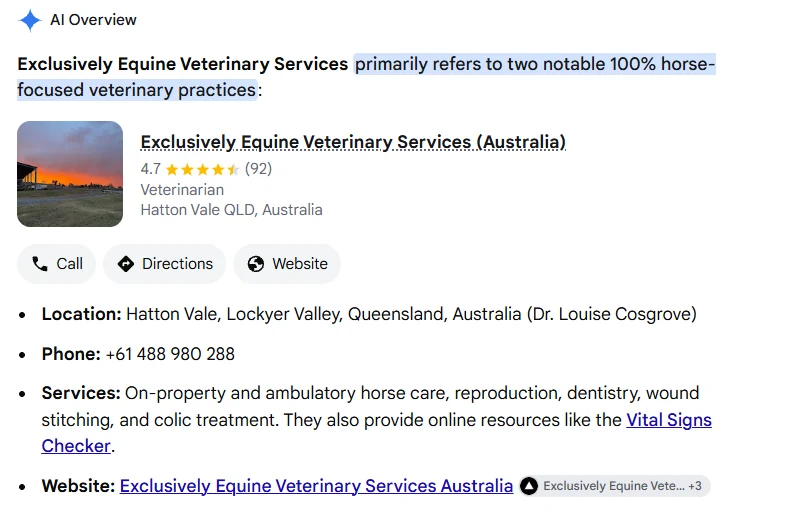
Consistent details also help AI tell your business apart from similar ones. When I searched “Exclusively Equine Veterinary Services”, Google’s AI Overview noted two horse-only practices with that name, then showed the right Australian profile with its rating, location and services. That only works when the details match everywhere.
You don’t need special files or markup for this. Google says there are no extra requirements to appear in AI Overviews or AI Mode, and no new machine-readable files or special schema are needed (Google Search Central).
Step 9: Check tracking and conversions
Rankings don’t pay bills. Calls, bookings and visits do. So the last thing I check is whether the business can actually see them:
- GA4 records form submissions and bookings as key events
- The website link in the Business Profile has a UTM tag
- Calls from the website are tracked, with a call tracking number or click-to-call events
- Search Console is verified and checked monthly
- Business Profile Performance (calls, directions, website clicks) is reviewed monthly
At EEVS, I monitored Search Console and Business Profile performance every month. That’s how I know what worked.
How I prioritize what I find
A list of 40 problems doesn’t help anyone. What helps is knowing what to fix first. I score every issue on two things: impact (how much it limits visibility or leads) and effort (time and cost to fix). Then I sort it into one of four levels.
| Priority | What it means | Examples | Fix by |
|---|---|---|---|
| Critical | Blocks visibility right now | Suspended or unverified profile, wrong primary category, key pages not indexed | This week |
| High | Big impact, low to medium effort | NAP mismatch on major platforms, missing service pages, no reviews in 3+ months | Day 30 |
| Medium | Steady gains | Missing secondary categories, weak internal links, no schema, slow pages | Day 60 |
| Low | Polish | Photo refresh, minor directory listings, regular posts | Day 90 |
Then I turn the list into a 30/60/90 day plan, with one owner and a due date for every task. A simple spreadsheet is enough.
Real example: my local SEO audit for an equine vet practice
Exclusively Equine Veterinary Services (EEVS) is a horse-only vet practice led by Dr Louise Cosgrove in Hatton Vale, Queensland. They offer on-property and ambulatory care, so it’s a hybrid business. My brief was local SEO only: no blog content push, no ads and no paid profile boosts.
What I found. Honestly, almost nothing on the SEO side was right:
- The Google Business Profile wasn’t optimized
- The page URLs weren’t optimized
- The content wasn’t written in an SEO-friendly way
- Images were uploaded at full size, some 5 MB and some 10 MB, which slowed every page
- The layout needed a redesign
What I did, over about three months:
- Optimized the Google Business Profile
- Fixed the URLs and restructured the content around services and location
- Resized and compressed every image
- Improved local relevance and citation consistency
- Moved the site to a new, cleaner layout
- Monitored Search Console and Business Profile performance every month
What happened next. Once the fixes were in, the site started getting clicks:
- Clicks from Google grew from about 1K in the 12 months before the work to 11.5K in the 12 months to May 2025
- 748K search impressions in the same 12 months
- 6,124 Business Profile views from December 2024 to May 2025, with “vet near me” and “equine vet” among the top searches
Read the full EEVS case study.
Local SEO audit tools (free and paid)
My core tools are Semrush, Ahrefs and the Fatrank extension, plus Google’s own free tools. You can cover most of this audit for free. Paid tools save time on rankings, links and citations.
| Tool | What it’s for | Cost |
|---|---|---|
| Google Business Profile | Profile checks and performance data | Free |
| Google Search Console | Queries, clicks and indexing | Free |
| Google Analytics 4 | Conversions and Business Profile traffic (with a UTM tag) | Free |
| PageSpeed Insights | Speed and Core Web Vitals | Free |
| Rich Results Test | Schema checks | Free |
| Fatrank | Quick organic rank checks in Chrome | Free version |
| Semrush | Keywords, rank tracking, backlinks, site audit; Map Rank Tracker with Semrush Local | Paid |
| Ahrefs | Backlinks and competitor link gaps | Paid |
| Local Falcon | Geo-grid Map Pack tracking | Paid |
| BrightLocal or Whitespark | Citation audits | Paid |
One thing I always remind clients: tools find issues, but they don’t decide what matters most for your business. That’s what the prioritization step is for.
DIY or hire? What a local SEO audit costs
If you have one location and a free day, you can do this audit yourself. I’d get help if you have several locations, a suspended profile, a sudden drop in calls or traffic, or simply no time.
Prices vary a lot. Two published examples:
- SEO Bridge (UK): £200 flat fee for a local SEO audit with an action plan
- 1Digital (US): $2,500 to $15,000 for an audit on its own
My local SEO audit is free. You get a prioritized list of what to fix, whether you do the work yourself or hire me. If you want me to handle it, my local SEO work starts from $500, depending on what your website and profile need. Get your free audit.
FAQs
How often should you do a local SEO audit?
I recommend a full audit once or twice a year, plus a monthly check of the Business Profile, reviews and rankings. I’d also run one after a move, a rebrand, a traffic drop or a suspension.
How long does a local SEO audit take?
About 4 to 8 hours for one location if you do it yourself. Multi-location businesses take longer. A professional audit usually takes a few days, including the report.
Can ChatGPT do a local SEO audit?
Not on its own. AI can help organize findings, but ChatGPT can’t see your Business Profile data, Search Console or real Map Pack rankings. You still need those tools, and someone who knows what matters.
Is there a free local SEO audit tool?
Partly. Google Business Profile, Search Console, PageSpeed Insights and the Rich Results Test are all free. Free audit tools catch website issues, but none of them cover every step in this guide. That’s why I still work from a checklist.
Is local SEO still worth it in 2026?
Yes. People still find local businesses on Google Maps, and AI tools pull from the same listings, reviews and websites. A clean local setup helps you in both places.
Do service-area businesses need a different audit?
Mostly the same steps. The differences: hide the address on Google, set accurate service areas, check rankings across the whole area, and only build area pages with real local content.
Get a free local SEO audit
If you’re not sure where your business stands, send it to me. I’ll check your Business Profile, listings, website and AI visibility, and send you a prioritized fix list. No pitch, no fluff.